Elegant Watercolor Wedding Invitations: A Designer's Guide
Capturing the essence of a romantic, nature-inspired wedding begins with the stationery. The Elegant Watercolor Wedding Invitations template suite is designed to do exactly that. It combines the soft, artistic touch of hand-painted watercolor with the crisp precision of modern vector graphics. This isn't just a static image; it's a fully editable set of design assets centered around a beautiful palette of dusty rose and lush greenery. The visual personality is one of understated romance and organic elegance, making it ideal for couples who want their invitations to feel personal, artistic, and timeless.
Visual Style and Composition
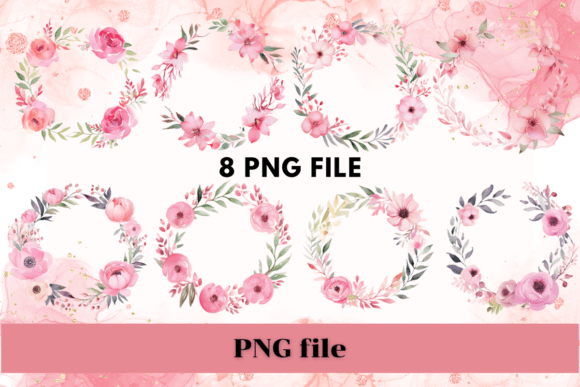
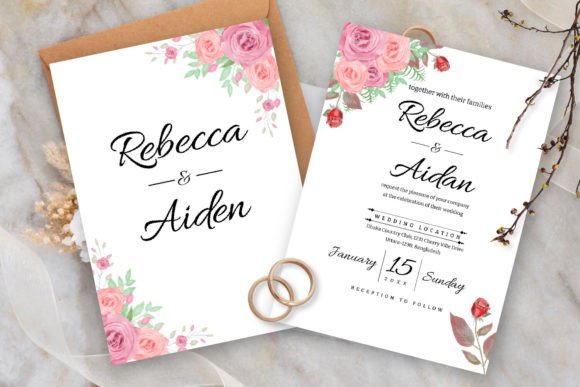
At the heart of this design is the delicate interplay between color and form. The dusty rose provides a warm, muted blush tone that feels both contemporary and classic. It avoids the sometimes overly sweet look of brighter pinks, offering a sophisticated alternative. This is complemented by detailed illustrations of greenery leaves, which introduce a natural, organic element. The watercolor effect itself is key—it gives the design a soft, textured quality that feels handmade and authentic, a quality often missing in purely digital designs.
The composition is balanced and airy, allowing the essential information to stand out. The use of whitespace is intentional, preventing the design from feeling cluttered. The floral and foliage elements are arranged to frame the text, guiding the eye naturally from the couple's names to the event details. This thoughtful layout is crucial for editorial design and print projects where readability is paramount. The overall effect is a harmonious blend of script font elegance and botanical illustration, creating a cohesive brand identity for the wedding event itself.
Practical Applications Beyond Weddings
While the name specifies "wedding invitations," the versatility of this template extends far beyond a single event. For designers and entrepreneurs, it serves as a foundation for a range of projects. The editable vector files in Adobe Illustrator mean you can scale, recolor, and modify every element. This flexibility is invaluable for creating a full suite of stationery, from save-the-dates and menus to thank you cards and programs.
Consider these practical applications:
- Brand Identity: The soft, approachable aesthetic is perfect for brands in the wellness, beauty, floral, or boutique lifestyle sectors. Use the elements to create logos, business cards, and packaging that convey a sense of care and artisanal quality.
- Digital Content: The included JPG files are ready for social media graphics, blog headers, or email marketing campaigns. The elegant style can elevate a simple announcement into a visually compelling piece of content.
- Publishing and Editorial: The template's clean layout and beautiful typography make it a strong candidate for editorial design in magazines, lookbooks, or recipe cards focused on themes like gardening, slow living, or romantic fiction.
- Commercial Products: Small business owners and crafters can use the assets to design product tags, thank you inserts, or promotional materials that align with a soft, elegant aesthetic.
Working with the Editable Vector Files
The true power of this package lies in its editability. The AI files are structured for easy customization in vector editing software. You can isolate the dusty rose watercolor washes, adjust the position of the greenery leaves, and completely change the text. This is where understanding font pairing becomes important. The template uses a free font, but you might want to pair it with a clean sans serif font for body text to enhance readability, especially for detailed information like addresses or schedules.
When editing, pay attention to visual hierarchy. Use the script font for the couple's names and key headings to draw attention, and pair it with a legible serif or sans serif for the smaller details. This creates a clear reading path. The 5"x7" wedding card and 3.5"x5" RSVP card sizes with bleed are industry standards, ensuring your files are print-ready without guesswork. Always proof a physical print to check color accuracy, as watercolor tones can vary between screens and printers.
Evaluating Fit and Enhancing Your Project
Before committing to any design asset, evaluate its fit for your specific project. Ask yourself: Does the color palette align with the brand or event's mood? Is the level of detail appropriate for the medium? For a web design header, the intricate details might need simplifying. For a high-quality print piece, they will shine.
This Elegant Watercolor Wedding Invitations template excels in scenarios calling for a premium font aesthetic without the premium price tag. It provides a professional foundation that can save hours of illustration time. However, it's not a one-size-fits-all solution. For a tech startup or a high-energy sports brand, the romantic watercolor style would likely conflict with the desired brand perception. For those projects, a modern display font or a geometric sans serif would be more suitable.
Ultimately, this template is a tool for creating beauty and connection. Its strength is in its ability to convey warmth, elegance, and a handcrafted feel. By understanding its components and applying them thoughtfully, you can leverage it to produce work that is both visually stunning and functionally effective, whether you're designing a wedding suite or building a cohesive visual identity for a client. The key is to use it as a starting point, not a final product, and to let your own creative vision guide the customization.