White Wedding Rose Sublimation Clipart: Beyond the Invitation
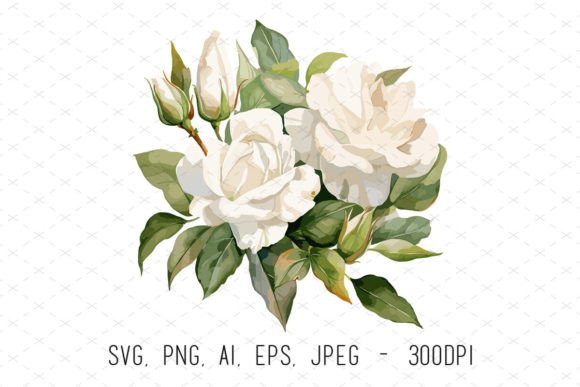
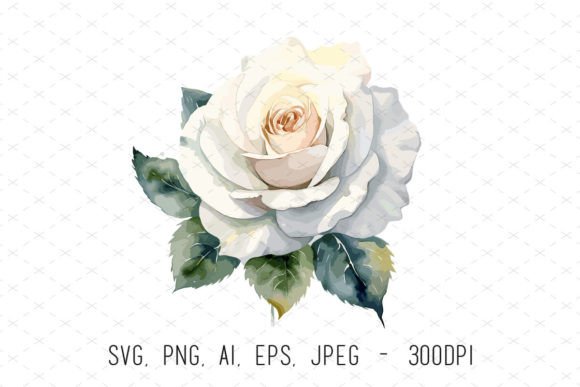
There’s a specific kind of elegance that watercolor captures better than any other medium. It’s soft, organic, and inherently romantic. When you bring that quality into a digital format, especially for projects like weddings or luxury branding, you get something incredibly versatile. The White Wedding Rose Sublimation Clipart isn't just a collection of flowers; it’s a design toolkit built for creators who need high-resolution assets that don't pixelate when you scale them up. If you are working on physical products or high-end digital layouts, having a 4500x4500px file at 300 DPI is non-negotiable. This set provides that density, ensuring your prints remain crisp whether they are on a small favor tag or a large back-drop banner.
The Anatomy of a Versatile Design Asset
When we talk about this specific White Wedding Rose Sublimation Clipart, we are looking at a blend of modern utility and classic aesthetics. The visual style relies on the "watercolor" effect—soft edges, subtle color bleeds, and a natural texture that feels hand-painted rather than computer-generated. This "personality" is crucial. In a world dominated by flat, vector graphics, a textured rose adds warmth and depth to a brand identity.
One of the strongest technical aspects here is the variety of file formats. You aren't just getting a PNG file with a transparent background (though that is essential for layering). You are also receiving SVG, AI, EPS, and JPEG formats.
- SVG and EPS files are critical for packaging design and large-format printing because they maintain quality at any size.
- AI files allow designers to tweak the vector paths in Illustrator, perhaps changing the opacity or isolating a single petal for a logo mark.
- PNGs are the workhorse for social media graphics and quick mockups in Photoshop or Canva.
This diversity makes the asset a premium font equivalent for imagery—it’s a professional-grade component designed for serious commercial use.
Strategic Applications for Modern Creators
How do you actually use this in a real-world workflow? The applications go far beyond standard wedding stationery. For small business owners and entrepreneurs, this clipart serves as a foundational element for brand identity.
Physical Products and Sublimation
The name implies sublimation, and for good reason. The 300 DPI resolution ensures that when heat-pressed onto fabric or ceramics, the ink doesn't look muddy. Imagine using these roses on:
- T-shirts and Apparel: A soft, vintage-style graphic on a tote bag or tee.
- Mugs and Drinkware: Wrapping the floral design around a coffee mug for a boutique gift shop.
- Wall Art: Creating gallery-quality prints that look like original watercolor paintings.
Because the background is transparent, you can layer these roses over textured papers or solid color backgrounds without worrying about ugly white boxes around the edges.
Digital Layouts and Editorial Design
In editorial design, such as digital magazines or blog headers, this clipart can act as a visual anchor. It works beautifully alongside serif fonts for a classic look or paired with a clean sans serif font to create contrast. The organic shapes of the roses break up the rigid grid structure of a webpage, making the content feel more inviting.
For web design, these assets are perfect for "About Me" pages or seasonal promotions. They add a high-end feel to a site without requiring a custom illustration commission. Similarly, for greeting cards and paper crafts, the ability to resize the image without losing quality means you can use the same rose for a business card and a poster.
Integrating Clipart into Visual Hierarchy
Good design is about visual hierarchy—guiding the viewer's eye to the most important information first. Floral elements like the White Wedding Rose Sublimation Clipart are excellent tools for framing. They don't compete with the text; they support it.
Consider using the roses to frame a headline. If you are designing a logo for a bakery or a boutique, placing the floral elements on either side of the name creates a balanced composition. It draws the eye inward. This is a technique often seen in packaging design, where the product name needs to pop amidst a busy shelf.
However, readability is key. If you are placing text over the top of the roses, you need to ensure sufficient contrast. A busy floral pattern can swallow light-colored text. In these instances, use the clipart as a border or a background element with reduced opacity, or place the text in a solid, contrasting box in the center. This maintains the professionalism of the layout while ensuring the message is clear.
Evaluating Fit and Commercial Licensing
Before integrating any design asset into a project, you must evaluate the fit. Does the watercolor style align with the brand's voice? If your brand is edgy, industrial, or ultra-minimalist, a soft rose might send mixed signals. But for brands focused on wellness, beauty, hospitality, or events, this style is spot-on.
When using assets like this, always review the licensing. Since this set is marketed for commercial use (mugs, t-shirts, etc.), it is built for resale. However, as a best practice, ensure you aren't just reselling the digital file itself. The value lies in how you transform it—combining it with typography, layout, and other elements to create a new product.
Finally, treat this clipart like you would a creative font. Test it. Put it in your mockups. See how it interacts with your specific color palette. Does it clash? Does it enhance? By treating the White Wedding Rose Sublimation Clipart as a strategic component of your design system rather than just a pretty picture, you unlock its full potential to elevate your creative projects.